For locums agencies, telehealth groups & medical-staff offices
Someone else can do the paperwork.
That’s the whole point. Every other multi-state CME tracker assumes one clinician, filing alone. Teams is built for whoever actually chases it down — with a roster that shows only who needs action, and access each clinician grants and can revoke.
Admins are unlimited and free — you pay per monitored provider.
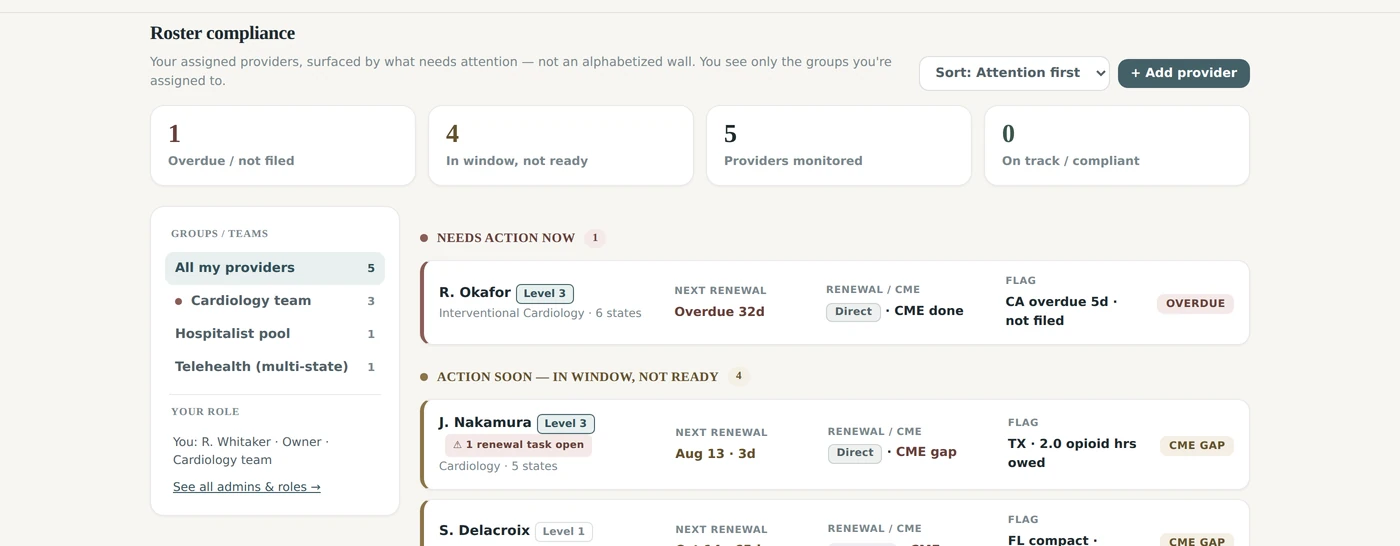
The roster, sorted by who needs action — not an alphabetical wall.
The gap nobody else fills
The trackers are built for one person.
Compliance never is.
In real practices, the person who knows where the certificates are is rarely the person whose license is on the line. A credentialing coordinator holds the folder. An office manager forwards the PDFs. A locums agency answers to the client hospital. Yet the major CME trackers still make the clinician log in and do every upload personally — and the enterprise products that do have dashboards make the organization the account holder, not the clinician.
The folder is not where the license is
Whoever chases the paperwork has no account, and the clinician who has the account has no time.
Enterprise products take the account
The dashboards that exist make the organization the owner, so the clinician loses the record when they leave.
Nobody offers a consent ceiling
Access is all-or-nothing, which is why clinicians refuse it and coordinators keep a spreadsheet.
How we compare
Six capabilities, six vendors
| Capability | Interstate Medicine | CME Agent | Mocingbird | Orbit CME | CE Broker |
|---|---|---|---|---|---|
| Roster dashboard for a group | Yes — attention-first, grouped by team | Yes (Enterprise, custom pricing) | Yes (Enterprise, custom pricing) | Enterprise line exists; no dashboard documented | No — individual accounts |
| A coordinator can upload a certificate for a clinician | Yes — at Level 3, with consent | Not documented | Not documented | Self-serve upload only | Concierge tier — their staff, not yours |
| Clinician sets exactly how much the org can see | Yes — 4 additive levels, revocable | Not documented | Not documented | Not documented | Not applicable |
| Clinician keeps the account when they leave | Yes — seat pauses, data stays theirs | Not documented | Not documented | Not documented | Yes (individually held) |
| All 51 jurisdictions, board-agnostic | Yes | Yes | Yes | Focused on its own credit catalog | Only states that use CE Broker |
| Published individual price | $60 / year | $348 / year | $199 / year | ~$360 / year (25 credits) | $39.99–$124.99 / year |
Comparison drawn from publicly available vendor documentation and pricing pages as of July 2026. “Not documented” means the capability is not described in the vendor’s public materials — vendors may offer it under a custom enterprise agreement. We re-check this table quarterly; tell us if anything here is out of date and we’ll correct it.
The admin dashboard
A roster sorted by who needs you this week
Not an alphabetized wall of 200 names. The dashboard opens on the handful of clinicians who actually need action — overdue filings, open CME gaps, renewals inside the window — and collapses everyone who’s fine. Admins see only the groups they’re assigned to.
THE ROSTER
Attention first, everyone else collapsed
Fourteen providers monitored; two need you today. Sorting by name is what turns a roster into a wall, so it is not the default.
ALERTING
Alerts that don’t behave like an individual’s reminders
A coordinator watching 200 providers cannot receive 200 reminder streams. Enterprise alerting is built around the roster, not the person: longer lead times, one weekly digest instead of per-event noise, and immediate escalation reserved for people who are actually not ready.
- Per-provider lead times at 120 / 90 / 60 / 30 / 14 days — you choose which fire
- Weekly roster digest — one email covering everyone you watch, on the weekday you pick
- Readiness escalation — breaks out immediately only when someone is inside the window and still has a gap, an unfinished non-CME step, or hasn’t filed
- Routed to the admins on that provider’s group, not the whole org
Teams is in early access: we set your roster up with you rather than by self-serve signup. Everything described in this section is live.
Delegated access
Four levels. The clinician picks.
You work at or below it.
This is the part other trackers don’t have. Access is granted per clinician, per organization, and it is additive — each level adds to the one before it. The clinician approves it, sees it listed in their own account, and can raise, lower, or revoke it at any moment without asking you.
Compliance only
Which licenses exist, whether CME is met, when each one expires. No license numbers. No personal details.
Full profile
Everything above, plus full license numbers, email, phone and date of birth — what credentialing actually needs to verify a provider.
Manage
Everything above, plus your staff can upload certificates on the clinician’s behalf and correct a license number or renewal date. Every correction is written to the clinician’s own activity log with your admin’s name on it.
Full control
Everything above, plus create the account on the clinician’s behalf and later assign it to their email so you both keep access.
Invite a clinician who already has an account
The default. Nothing appears on your dashboard until they say yes — they review exactly what the level exposes, approve it, and can change or revoke it at any time.
Create a managed account for them
For onboarding, when the clinician hasn’t signed up yet. The account is assigned to the clinician’s own email from the first second; once they claim it they can lower or revoke your access. An existing account is never taken over.
Enforced, not merely hidden
Levels are enforced server-side on every read and write — not by hiding buttons. Revocations take effect immediately, every admin action is written to an audit log, and the clinician can read that log.
One clinician, several organizations. A locums physician might sit on three rosters at once — a staffing agency at Level 3, a telehealth group at Level 1, a hospital medical-staff office at Level 2 — each seeing only its own slice, all from the one record the clinician owns.
Not a group? You still shouldn’t be doing this yourself
Name a helper. They do the uploading;
your name stays on the record.
An individual Pro membership includes up to three helpers, free — an office manager, a practice coordinator, a spouse who handles the filing cabinet. They work inside your account at the level you set, and you can pull the permission back with one click.
Three helpers, no charge
Helpers don’t need their own subscription and don’t count as seats. Each gets an emailed invitation that binds to their own sign-in — never yours — so every action is attributable to a person.
Or just forward the email
Certificates can be forwarded to the clinician’s personal upload address by them or by a helper. We read them, match them to the mandates they satisfy in every state that clinician holds, and drop them in the review queue.
You stay the account holder
A helper can add to your record; they can’t take it over, can’t delete it, and can’t see anything you haven’t granted. Revoke access and their view disappears immediately.
Governance & data ownership
The organization buys the view.
The clinician keeps the record.
This distinction is what makes delegation safe to offer — and it’s the reason clinicians agree to be monitored at all. The account belongs to the individual. The seat belongs to whoever pays for it.
Enforced at the database
Per-link permissions are applied in the database — row-level security on every query, plus level-scoped views for the fields inside a row — so an admin physically cannot read a field their level doesn’t cover, regardless of what the interface does.
Every action logged, both ways
Who uploaded what, who changed a license record, when a level moved. The clinician sees the full log in their own account. Your organization’s slice of it is available on request today.
Seat sponsorship, cleanly handled
Adopt a clinician who already pays for Pro and we’ll pause their personal subscription and credit the unused portion against your invoice. If they leave your roster the account stays theirs, with their whole history intact.
Pricing
Pay for monitored providers. Nothing else.
Volume tiers apply automatically, there’s no minimum, and admin seats never cost anything. Billing runs on invoices with PO, net terms and ACH — a real AR process, not a self-serve card form.
- Roster dashboard with attention-first sorting
- Groups / teams and owner · manager · viewer roles
- Weekly digests and readiness escalation
- Delegated access at Levels 1–4, per clinician
- Per-state audit packets and credentialing letters
- All 51 jurisdictions, reviewed quarterly against each board
Quotes, contracts and annual true-ups: hello@interstatemedicine.com · Invoices and AR: billing@interstatemedicine.com
Questions
The ones procurement always asks
Can our coordinator actually upload a certificate for a physician?
Yes — that’s Level 3. Once a clinician grants your organization Level 3 for their record, your staff can upload certificates on their behalf. Correcting license records from the admin side is rolling out now. The clinician sees every one of those actions in their own audit log, and can drop you back to Level 1 or revoke entirely at any time without contacting you.
Does the organization own the clinician’s data?
No, and that’s deliberate. The account belongs to the individual clinician; your organization buys a view into it at the level they consented to. When they come off your roster, their record — every certificate, every license, the full history — goes with them. It’s the reason clinicians agree to be monitored in the first place.
What exactly can we see if a clinician only grants Level 1?
Which licenses they hold, whether each state’s CME is met, and when each license expires. No license numbers, no date of birth, no contact details, no certificates. It’s enough to answer “is this provider compliant and are they about to lapse” — and nothing more. Many clinicians start here and raise the level once they trust the process.
Do you report credits to the boards for us?
No. We organize and format the complete record and hand you everything a board or CE Broker needs — a per-state audit packet with the transcript, the certificates, and the citation each one satisfies. You or the clinician submits it. We are not an accrediting body and we don’t validate or award CME, which is what keeps us independent and keeps the clinician in control.
Can one clinician be on two organizations’ rosters at once?
Yes, at different levels simultaneously — a staffing agency at Level 3 and a hospital medical-staff office at Level 1, for example. Each organization sees only its own link. Each organization is quoted for that clinician on its own roster, because each is buying its own view; the clinician’s own membership is separate and unaffected.
What happens if a clinician revokes access mid-cycle?
Their data disappears from your dashboard immediately and your admins lose read and write access on the next query — enforcement is server-side, so no new data can be fetched from the moment they revoke. You keep any audit packets you already exported, and we credit the seat at your next review. In practice revocation is rare; the point of showing clinicians exactly what you can see is that they stop worrying about it.
Bring the whole roster into one view.
Walk through the dashboard with your own scenario — how many providers, how many states, who does the chasing today — and we’ll show you what it looks like on day one.